Nā–¶C
NextClip

Navigate thousands.
Organize instantly.

Professional video player for macOS users who manage large collections and refuse to compromise on keyboard efficiency.

Download Free See Features

Free with optional tips • macOS 15 (Sequoia) or later • 65 MB download
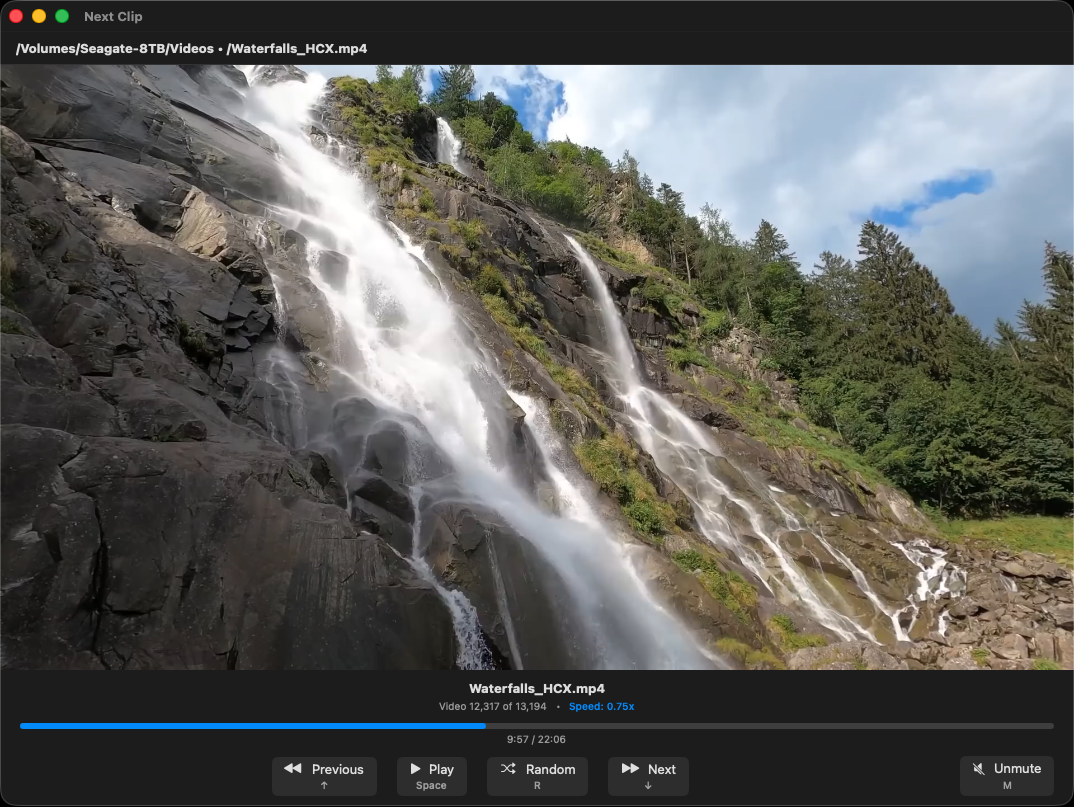
NextClip main interface showing video playback with keyboard controls
10,000+
Videos handled effortlessly
100%
Keyboard controlled
3 Keys
To organize any video

Most video players choke on 1,000 files.

NextClip handles 10,000 without breaking a sweat.

Built for real workflows

šŸ“Š

Built for Scale

Your 10,000-video folder doesn't scare us. NextClip was architected for massive video libraries from day one.

  • āœ“ Scan entire drives without UI freezes
  • āœ“ Sort thousands of files in seconds
  • āœ“ Navigate collections of any size
  • āœ“ Subfolder support for organized libraries
āŒØļø

Complete Keyboard Control

Your hands stay on the keyboard. Period. Every single action has a keyboard shortcut.

↑↓ Previous/Next video
Space Play/Pause
1, 2, 3 Move to preset folders
[ ] Speed control
R Random video
šŸ“

Organize While You Watch

Press 1, 2, or 3. Video moved. Next. No dialogs, no confirmations, no interruptions.

  • āœ“ Set three destination folders in settings
  • āœ“ Single keypress to organize
  • āœ“ Perfect for sorting footage or curating collections
  • āœ“ Keep working at full speed
šŸŽ¬

Professional Playback

Features pros need. Speed everyone wants. Professional features without the complexity.

  • āœ“ 10 playback speeds (0.05x to 3x)
  • āœ“ Customizable seek times
  • āœ“ Sort by name, path, size, or random
  • āœ“ Boss key for instant privacy

Perfect for

šŸŽ„

Video Editors

Review 2,000 raw clips. Sort the keepers. What took hours now takes minutes.

  • • Scan entire shoot folders
  • • Categorize takes with 1, 2, 3
  • • Jump to next instantly
šŸ“š

Content Curators

Organize 5,000 videos by topic. Turn chaos into a curated library.

  • • Navigate thousands with arrows
  • • Categorize as you watch
  • • Random shuffle for rediscovery
šŸ”¬

Researchers

Catalog 10,000 historical videos. Your archive, finally navigable.

  • • Scan complete archives
  • • Sort by any metadata
  • • Organize systematically
šŸ”’

Your videos stay yours

Zero data collection. No analytics. No tracking. No cloud sync. Everything stays on your Mac.

Read our privacy policy →

Ready to manage thousands of videos?

Free to download and use. Pay what you want.

NextClip for macOS
Version 1.0 • 65 MB
Download Free
• Requires macOS 15 (Sequoia) or later
• Apple Silicon and Intel supported
• Direct download (not on App Store)

Pay What You Want

NextClip is free. If it saves you hours of work, consider leaving a tip.

No features locked. No nags. No time limits.
Just a video player that respects your workflow.

Frequently Asked Questions

How many files can NextClip handle?

We've tested with 10,000+ videos. The limit is your hard drive, not NextClip. Our asynchronous architecture prevents UI freezes even with massive collections.

Do I need to learn keyboard shortcuts?

Keyboard hints are displayed on every button (optional setting). Learn as you go. We also provide a complete keyboard shortcuts reference window (⌘/).

What's the "three-key organization" feature?

Set three destination folders in settings. Press 1, 2, or 3 while watching to instantly move the current video to that folder. Perfect for sorting footage or organizing collections.

Why isn't NextClip on the App Store?

Direct distribution lets us deploy fixes faster and host multiple version without the restrictions of the App Store.

What video formats are supported?

NextClip uses macOS native video playback, supporting MP4, MOV, M4V, and 3GP files. If QuickTime can play it, NextClip can play it.

Is my data private?

Absolutely. NextClip has zero tracking, zero analytics, and zero data collection. Everything stays on your Mac. Read our privacy policy.